Free Google Sheets templateLink sent by email
Know every bill this month, and what's left after.
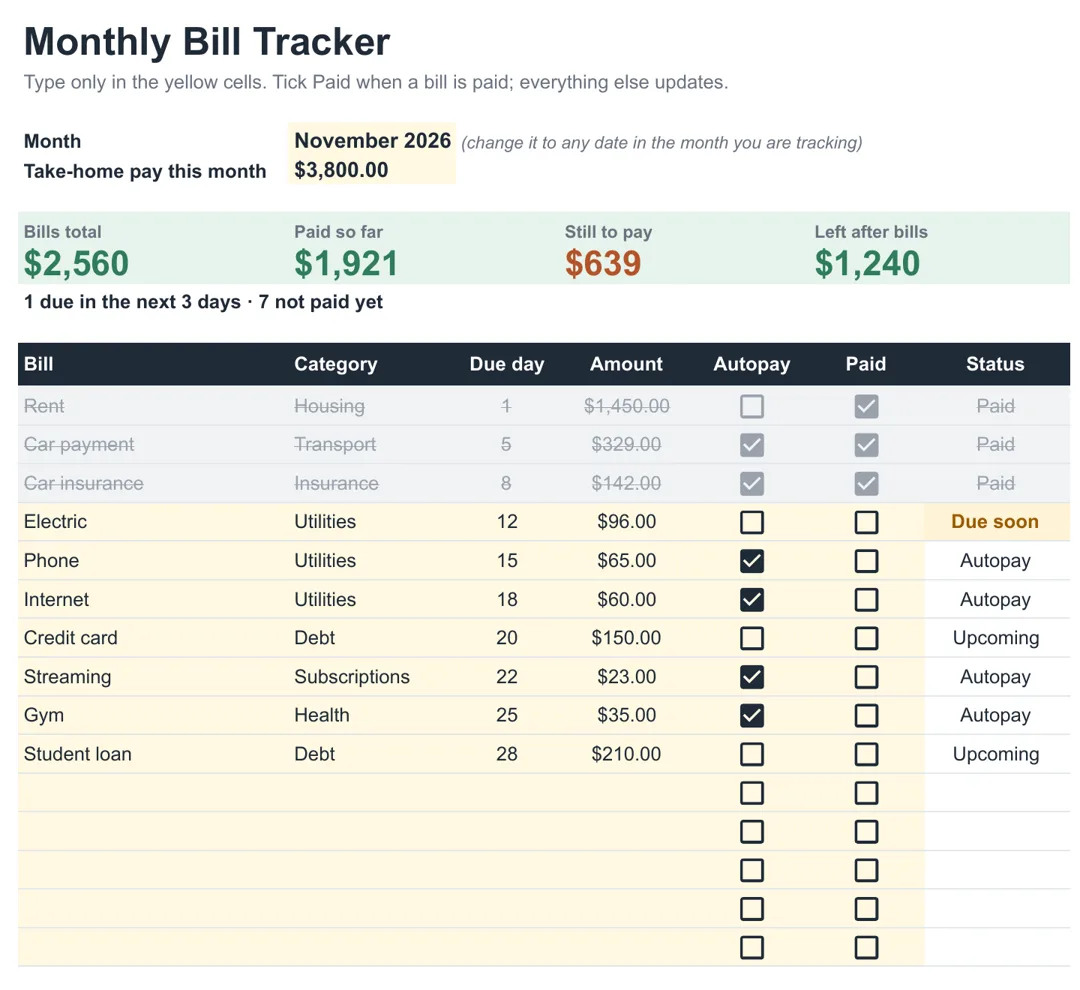
A one-tab bill tracker. Add your bills once, tick them off as you pay, and it shows what's paid, what's still due, and what's left from your paycheck.
You get the link right away, plus budgeting tips and new templates now and then. Unsubscribe anytime. Privacy Policy
Check your inbox
Your tracker link is on its way to your inbox. Not there in a few minutes? Check Promotions or Spam.
What it does
Four numbers and a list. That's the whole thing.
- $1,240 left
Shows what's left
Enter your take-home pay and it subtracts every bill, so you know what you have to live on.
- Due soon
Flags what's due
Bills due in the next 3 days turn amber. Missed ones show as overdue.
- $1,450.00
Paid bills grey out
Tick Paid and the row greys out, so you only see what still needs paying.
- Autopay
Knows your autopays
Mark the bills that pay themselves, so you're not chasing them every month.
How it works
Set up in about two minutes.
Get the link
Enter your email above and open the link we send you.
Make your copy
Google Sheets asks to make a copy. It's yours to keep and edit, on any device.
Add your bills
Type over the example bills, set your pay, and tick them off as you go.
Want paychecks, savings and debt in one place too? The full budget spreadsheets are in the ArborFlow Etsy shop.
See the templates